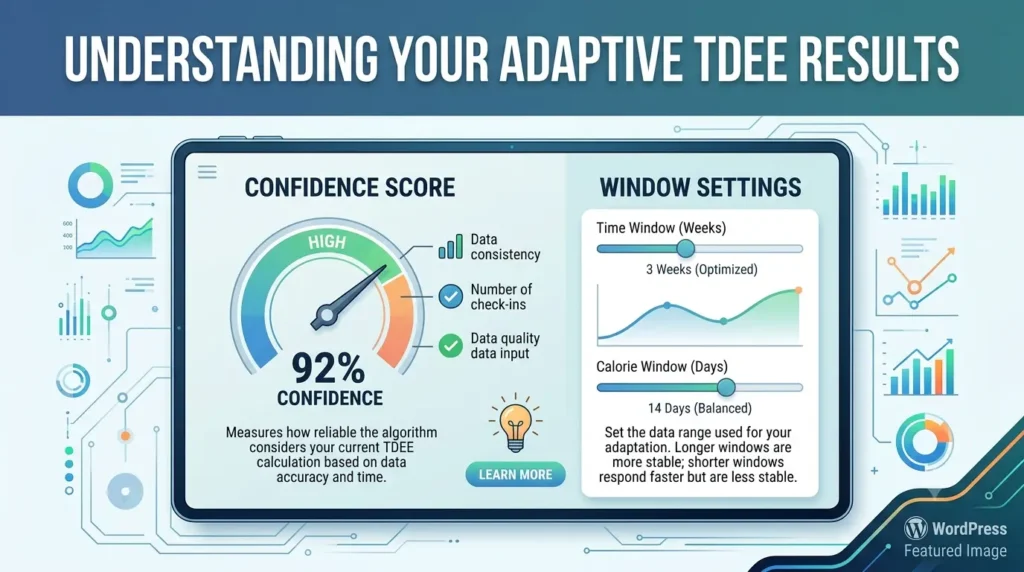
Two people can log the exact same weight and calorie data into an adaptive TDEE calculator and walk away with very different trust in the number. One sees "Confidence: 82%" and takes the result seriously. The other sees "Confidence: 34%" and has no idea if that means their TDEE is wrong, or just not fully calculated yet. A raw calorie number with no context behind it can send you into a diet plan based on a guess dressed up as data.
This guide breaks down exactly what your confidence score is measuring, what the 21-day and 28-day window settings actually change, and what to do when your confidence score won't budge above "low." If you're using the adaptive TDEE calculator, this is the page that explains what's happening behind your results.
What the Adaptive TDEE Confidence Score Actually Measures
Your confidence score isn't a single measurement. It's a blend of three separate things: how much data you've logged, how consistent your logging has been, and whether any of your recent entries look like outliers. Each one pulls the score up or down independently.
Days Logged and Data Completeness
The first factor is simple: more days of clean data means more confidence. A trend line fit through 5 days of weight readings can be pulled off course by one bad night's sleep or one salty meal. A trend line fit through 25 days barely notices the same blip. Completeness matters too, not just total days since you started. If you've been tracking for a month but only logged weight on half those days, the calculator is working with a thinner dataset than the calendar suggests.
Logging Consistency (Coefficient of Variation)
The second factor looks at how steady your day-to-day numbers are relative to your average, a measure statisticians call the coefficient of variation. If your calorie entries jump from 1,400 one day to 3,200 the next with no pattern, that's high variation, and the calculator has a harder time separating real signal from noise. Steady, honest daily logging, even at numbers that aren't perfectly on plan, produces a cleaner read than sporadic logging that swings wildly.
Outlier Detection and Its Effect on Confidence
The third factor checks whether your most recent entries look like they belong with the rest of your data. A single weigh-in that's 3 kilograms off your trend, maybe from a heavy meal the night before or a new scale on a different floor, gets flagged and weighted down rather than treated as gospel. This protects your TDEE from being yanked around by one weird morning. But if outliers keep showing up, confidence stays capped even with plenty of days logged, since the tool genuinely can't tell which numbers to trust.
Confidence Score Ranges Explained
Here's roughly what each confidence range means and how to treat the number it comes with.
| Confidence Range | What It Means | What To Do |
|---|---|---|
| 0-49% (Very Low / Low) | Formula estimate still carries most of the weight | Keep logging daily, don't act on the number yet |
| 50-69% (Medium) | Your own data is starting to take over | Use as a rough guide, recheck weekly |
| 70-100% (High / Very High) | TDEE reflects your real, current metabolism | Safe to set calorie targets from this number |
Very Low and Low Confidence (0-49%) — What It Means
At this stage, the calculator is still leaning heavily on your formula-based starting estimate because it simply doesn't have enough of your own data yet. This is completely normal in your first week or two. Treat the TDEE shown here as a placeholder, not a target to build a diet around.
Medium Confidence (50-69%) — What It Means
Somewhere in this range, your logged weight and calorie trend starts outweighing the formula guess. The number is becoming useful, especially for spotting direction (are you actually losing, gaining, or holding steady at this intake), but it can still shift by a meaningful amount as more days come in. Good for planning, not yet for fine-tuning.
High and Very High Confidence (70-100%) — What It Means
This is where the tool is doing what it was built to do. You've got enough days, consistent enough logging, and few enough outliers that the TDEE shown reflects your actual body rather than a population average. This is the range where it's reasonable to set a calorie deficit or surplus directly off the number, and to trust it until your next scheduled recheck.
21-Day Window vs 28-Day Window — Which Should You Choose
Both settings do the same core job: they set how many recent days of data the trend line is drawn through. The difference is how fast the tool reacts to new information versus how steady it stays against noise.
When the 21-Day Window Is Better
A shorter window reacts faster. If you just changed your training volume, started a new phase, or want to catch a weight-loss plateau early, 21 days shows you the shift sooner. The tradeoff is a bit more sensitivity to a rough week of logging or a run of salty meals.
When the 28-Day Window Is Better
A longer window smooths out more day-to-day noise, which suits people whose weight bounces around a lot from water retention, travel, or an irregular schedule. It's steadier, but slower to reflect a genuine recent change in your body or habits. If your logging is already very consistent, 28 days tends to give the more stable long-term number.
Switching Windows Mid-Tracking — What Happens to Your Data
Switching from 21 to 28 days, or back, doesn't erase anything. Your full log stays intact, and the calculator simply redraws the trend line using the new window length the next time it recalculates. You may see your confidence score and TDEE shift slightly right after switching, since the tool is now looking at a different slice of your history, but it settles back down within a few days of continued logging.
Why Your Confidence Might Be Stuck Low
If your confidence score won't climb no matter how long you've been using the tool, it's usually one of three things.
Logging Gaps and Missed Days
A few missed days here and there is fine. Frequent gaps are what actually hurt you, since each one is a hole in the trend the tool has to work around. If you're skipping two or three days a week, that's very likely the reason confidence has stalled.
Water Weight Outliers Skewing the Trend
Sodium, carbohydrate intake, hormones, and hydration can all shift the scale by a kilogram or more overnight without any real change in body fat, a pattern well documented by Cleveland Clinic's overview of daily weight fluctuations. If you're weighing in at wildly different times of day, or right after high-sodium meals, you're feeding the calculator noisy outliers that keep getting flagged and discounted, which caps your confidence even with plenty of days logged.
Inconsistent Weigh-In Timing
Weighing yourself first thing in the morning one day and after dinner the next introduces variation that has nothing to do with your actual trend. This is one of the simplest fixes on this list and often the single biggest lever for pushing confidence up quickly.
How to Improve Your Confidence Score Fast
A few habit changes move your confidence score faster than almost anything else:
- Weigh yourself at the same time every day, ideally first thing in the morning before eating or drinking, as this is the most stable reading your body produces in a 24-hour cycle
- Log calories daily, even on days you go over or under your plan, since honest numbers help the calculation more than gaps do
- Avoid skipping more than one day in a row wherever possible
- Give it a full 21-28 days before judging the result, since metabolic adaptation and normal trend-fitting both take time to resolve, a process explained in NIH-published research on metabolic adaptations during weight change
- Don't react to a single weird weigh-in by changing your intake that same day; let the smoothing do its job
- Recheck your baseline stats if your weight or activity level has changed significantly since you started
Frequently Asked Questions
Why is my adaptive TDEE confidence low even after two weeks?
Two weeks is often still in the medium range, not low, unless you've had frequent logging gaps or inconsistent weigh-in times. Check whether you've missed several days or whether your weight readings vary a lot in timing, since both of those cap confidence more than the number of days alone.
How many days for accurate adaptive TDEE results?
Most people see a usable number after 14 days and a genuinely reliable one after 21-30 days of consistent logging. The exact timeline depends more on how steady your logging is than on the calendar date.
How accurate is adaptive TDEE compared to a formula-based calculator?
Once confidence is high, adaptive TDEE reflects your real metabolism rather than a population-average guess, which is why it can differ from a formula estimate by several hundred calories. Formula-based numbers are a reasonable starting point on day one, but they can't account for your individual muscle mass, activity, or metabolic rate the way your own logged data can.
Should I trust my TDEE if confidence is only medium?
Medium confidence is fine for general direction, like confirming you're roughly maintaining, gaining, or losing at your current intake. For fine-tuning a cut or bulk, it's worth waiting until you reach high confidence before locking in exact calorie targets.